ip
TobTahc User Guide
TobTahc is a task management chatbot that helps you keep track of your todos, deadlines and events. With a simple command-line style interface and persistent storage, TobTahc makes task management effortless.
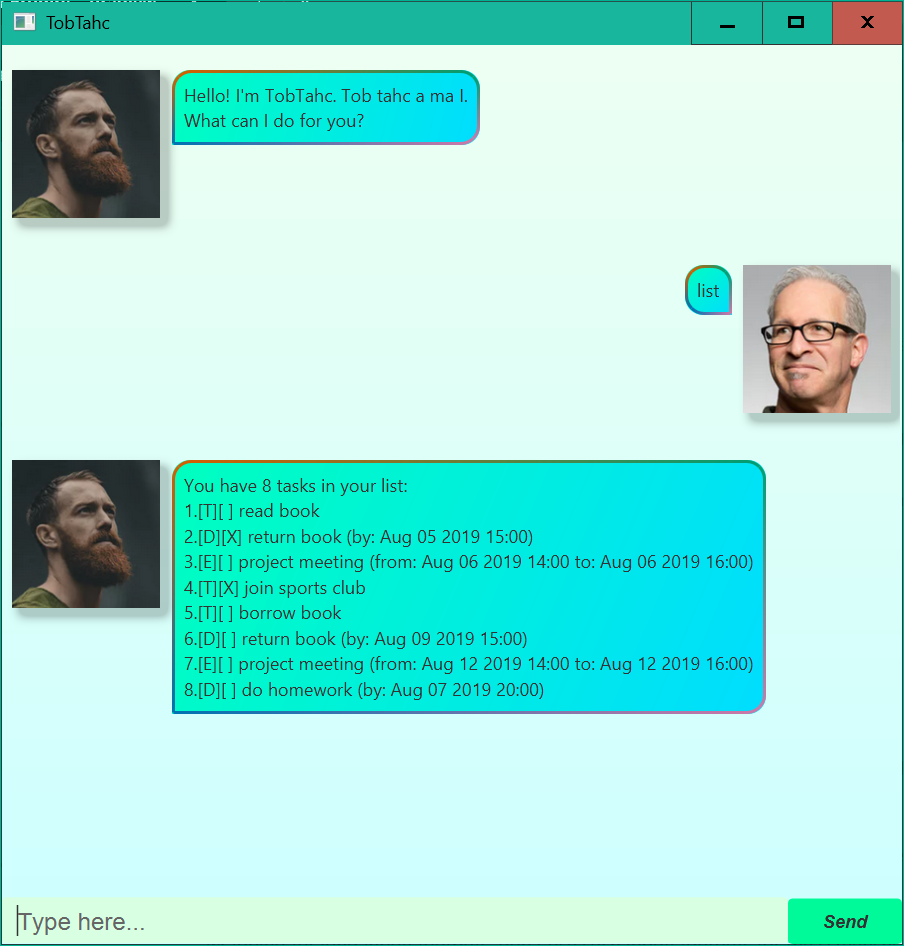
Quickstart
- Download the jar file from here.
-
Run the following command within the enclosing folder of the JAR file.
java -jar tobtahc.jar - Type commands in the text field and press Enter or click Send.
- The
datadirectory is for storing your tasks.
Program Options:
Usage: java -jar tobtahc.jar [options]

Options:
  -g, --gui, /gui      Start the application in GUI mode (default)
  -c, --cli, /cli      Start the application in CLI mode
  -h, --help, /?       Show this help message
Features
Adding a ToDo: todo
Add a simple task w/o any date or time.
Format: todo <task description>
Example: todo read book
Adding a Deadline: deadline
Add a task with a due time.
Format: deadline <task description> /by <due time in format y-M-d HH:mm>
Example: deadline return book /by 2019-8-5 15:00
Adding an Event: event
Add a task with both start and end times.
Format: event <task description> /from <start time in format y-M-d HH:mm> /to <end time in format y-M-d HH:mm>
Example: event project meeting /from 2019-8-6 14:00 /to 2019-8-6 16:00
Listing All Tasks: list
Display all tasks in the task list.
Format: list
Task Status Symbols:
[T]= ToDo,[D]= Deadline,[E]= Event[X]= Done,[ ]= Not Done
Marking a Task as Done: mark
Mark a task as completed.
Format: mark <task no.>
Example: mark 1
Marking a Task as Not Done: unmark
Mark a task as incomplete.
Format: unmark <task no.>
Example: unmark 1
Deleting a Task: delete
Remove a task from the task list.
Format: delete <task no.>
Example: delete 1
Finding Tasks: find
Search for tasks containing the keyword. The search is case-sensitive and matches any part of the task description.
Format: find <keyword>
Example: find book
Clearing All Tasks: clear
Completely wipe the task list.
Format: clear
Listing all Deadlines due before or on a certain date: before or on
List all Deadlines that are due before or on a certain date.
Format: before or on <date in format yyyy-MM-dd>
Example: before or on 2019-08-06
Listing all Events occuring on a certain date: occurs on
List all Events that occur on a certain date.
Format: occurs on <date in format yyyy-MM-dd>
Example: occurs on 2019-08-12
List all Tasks in a sorted way: sort
List all tasks in a sorted way:
- All Deadlines that are not done, sorted by due time.
- All Events that are not done, sorted by start time.
- All ToDos that are not done.
- All tasks that are done.
Format: sort
Exiting the Application: bye
Exit TobTahc.
Format: bye
TobTahc just echos anything that is not a command.
And sometimes, TobTahc would have a flipped response (like how TobTahc is flipped ChatBot) to add some variety.
Data Storage
TobTahc saves all your tasks in data/tasks.txt. You may take a look at data/tasks-example.txt for an example tasks.txt.
Date and Time Format
As you can see in the previous section, some commands ask you to input a date time in format y-M-d HH:mm, while some commands ask you to input a date in format yyyy-MM-dd. And TobTahc is not very flexible on date time format, so if you see that TobTahc cannot understand your command, please check your date time format accordingly.
Date
y/yyyy: Year (2019).M: Month of the year (1-12 or 01-12).d: Day of the month (1-31 or 01-31).MM: Month of the year (01-12).dd: Day of the month (01-31).-: Literal separator.
Time
HH: Hour of the day (00-23).mm: Minute of the hour (00-59).:: Literal separator.